
Verkooporders: standaard inrichting Status en acties


Statussen en acties Verkooporders
Onderstaande tabel geeft de standaard inrichting weer van de statussen en acties in het verkooporderproces. De bronstatus is de status, waarin het proces zich bevindt. De doelstatus is de status waarin het proces overgaat na uitvoering van de actie. Een doelstatus dient - met uitzondering van de eindstatus - tevens als bronstatus opgenomen te worden.
| Bronstatus | Actie | Doelstatus |
| Aangemaakt | Wijzigen alles | Aangemaakt |
| " | Wijzigen algemeen | Aangemaakt |
| " | Wijzigen prijzen | Aangemaakt |
| " | Wijzigen aantallen | Aangemaakt |
| " | Wijzigen data | Aangemaakt |
| " | Goederen leveren | Pakbon |
| " | Wijzigen eenheden | Aangemaakt |
| " | Verwijderen | Verwijderd |
| " | Bevestigen | Herbevestigen |
| " | Annuleren | Geannuleerd |
| Geïmporteerd | Wijzigen alles | Geïmporteerd |
| " | Valideren | Aangemaakt |
| Herbevestigen | Wijzigen alles | Herbevestigen |
| " | Wijzigen algemeen | Herbevestigen |
| " | Wijzigen prijzen | Herbevestigen |
| " | Wijzigen aantallen | Herbevestigen |
| " | Wijzigen data | Herbevestigen |
| " | Goederen leveren | Pakbon |
| " | Verwijderen | Verwijderd |
| " | Herbevestigen | Herbevestigen |
| " | Annuleren | Geannuleerd |
| Pakbon | Wijzigen alles | Pakbon |
| " | Fiatteren voor facturatie | Gefiatteerd voor facturatie |
| Gefiatteerd voor facturatie | Wijzigen alles | Gefiatteerd voor facturatie |
| " | Factureren | Gefactureerd |
| Gefactureerd | Wijzigen alles | Gefactureerd |
| Geannuleerd | Wijzigen alles | Geannuleerd |
| " | Verwijderen | Verwijderd |
| Verwijderd | Wijzigen algemeen | Verwijderd |
Voorbeeld
In onderstaande afbeelding zie je dat de status Aangemaakt door de actie Goederen leveren overgaat naar de status Pakbon. Bij acties is het mogelijk om een keuze te maken of bij het uitvoeren de gebruiker een memoveld dient in te vullen. Voor het Gebruikers memo zijn de volgende opties beschikbaar: Geen, Optioneel of Verplicht.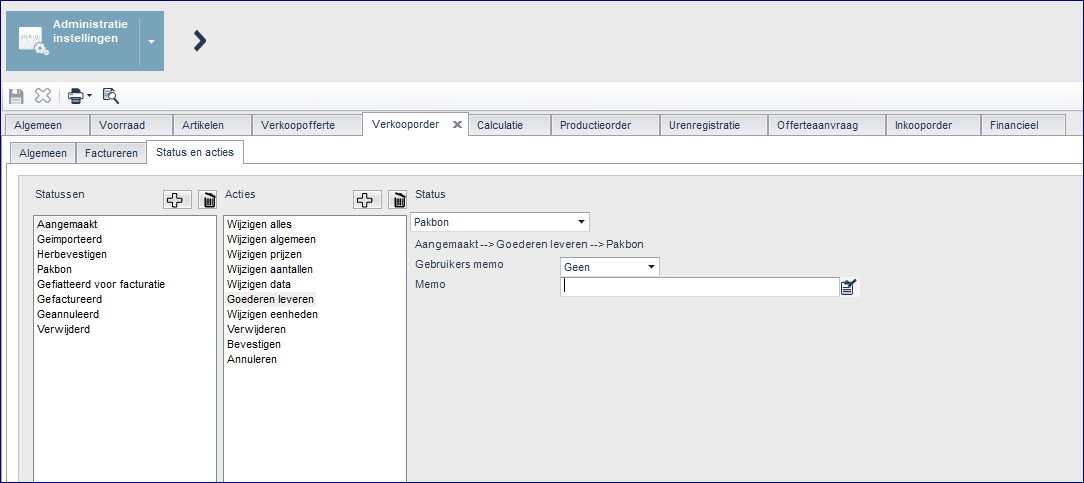
Let op! Wijzigingen aanbrengen in de standaard inrichting van het status-en-actiemodel kan vergaande gevolgen hebben binnen MKG. Daarom adviseren wij dit in overleg met de applicatiebeheerder of de MKG consultant of via de MKG Helpdesk te doen.
- Published:27 jun 2019 07:53
- TypeHandleidingen
- Category
- Product
- AvailabilityOpenbaar