
How to Create an Activity in My MKG?
|
The 'Activities' tab has an interactive setup. Every appointment you make with MKG or that your colleague makes for you can be found here as an activity. Whether it concerns an appointment with an MKG consultant, an action within the framework of the implementation plan, or a course. You can also add your own action points here. |
On the 'Activities' tab, you create a new activity above the calendar using NEW. On the right side of your screen, the Detail appears with the (currently empty) information about the activity.
Four Types of Activities
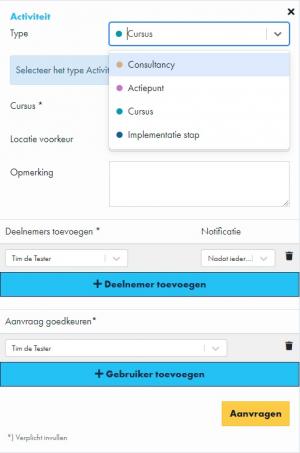
We distinguish four types of activities: 'Action Point', 'Consultancy', 'Course', and 'Implementation Step', each recognizable by its own color. The color of the dot corresponds with an item created in the calendar. You must always choose an activity type first. By default, the type 'Action Point' is pre-filled.
How to create an action point?
How to request consultancy?
How to register for a course?
How to schedule an implementation step?
- Published:24 Feb 2026 23:12
- Latest update:25 Feb 2026 00:12
- TypeHandleidingen
- Category
- Product
- AvailabilityOpenbaar