
How to Set Up Production Locations
|
|
With the help of Production Locations, semi-finished products and processed materials can be tracked during the production process. A production employee will always know where the semi-finished products and/or processed materials have been placed after the previous operation. |
Configure the Administrative Settings
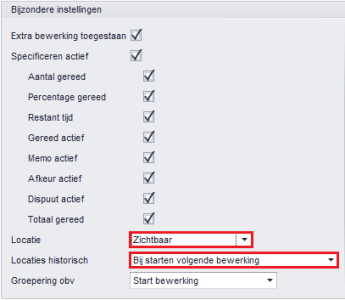
In the administrative settings, the 'Location' must be set to at least 'Visible'. You have two other options here: 'Not applicable' and 'Mandatory'. The latter setting means that an employee must enter a location when Specifying an operation.
The setting 'Locations historical' is by default set to 'At start of next operation'.
|
|
Administrative Settings
|
Configure the Warehouse Locations
Add the production locations to the table Warehouse Location
Enter the rack number, aisle, or a combination thereof in the Description field. Alternatively, you can enter the names of the machines if products are placed at that location. You have the freedom in this.
Then ensure that the setting 'Active on shop floor' is checked. You can find this in the Detail of the Warehouse Location.

Operations and Resources
The modules Operations
and Resources
contain the group 'Production Locations' with two fields:
- Warehouse Location In. Enter the location to which items should be moved prior to the operation.
- Warehouse Location Out. Enter the location which should be filled by default when specifying.
|
|
Note! |
The Production Location Table
In the table Production Location
you will find all records. By filtering on 'Active' here, you will immediately know where all products are located at that moment. In this table, you also have the option to move products to another production location. This does not concern a batch transfer.
- Published:24 Feb 2026 23:19
- Latest update:23 Sep 2026 12:47
- TypeHandleidingen
- Category
- Product
- AvailabilityOpenbaar