
Purchasing Material with Purchase Specifications
Purchase Specifications per Bill of Materials Material
For the production of a frame for a workbench, an item with a bill of materials can be useful if purchase specifications are attached to the purchase of the material. In this example, the bill of materials semi-finished product consists of four bill of materials materials.
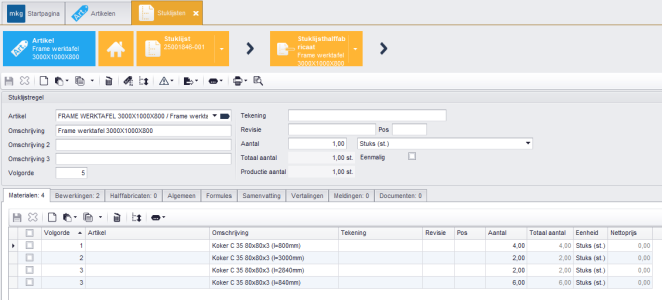
Specification Types and Specification Codes
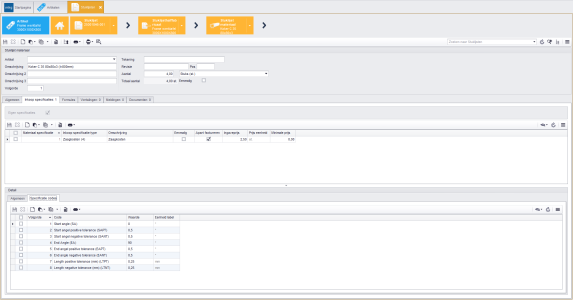
In each bill of materials material, you will find the 'Purchase Specifications' tab, where the specification types are visible. In this example, only the cutting costs per piece are specified as a specification type.
The specification codes can be found in the Detail of each specification type. Specifying all cutting angles and tolerances form the specification codes in this example.
|
In the table Purchase Specification Type you set up the specification types. Consider setup costs, material costs, packaging costs, cutting costs. For each type, you indicate whether it is one-time or not and whether it is billed separately or not. You can also link specification codes to a type. |
|
The table Specification Code is used to set up the different codes you can apply to a specification type. Consider certificates, colors, tolerances, cutting angles. A code can consist of text, a dropdown list, a date, a number, a yes/no, or a table. |
Create a Production Order
When you create a production order based on the item with a bill of materials, the semi-finished product will consist of four material lines that you can then purchase via the Purchase List.
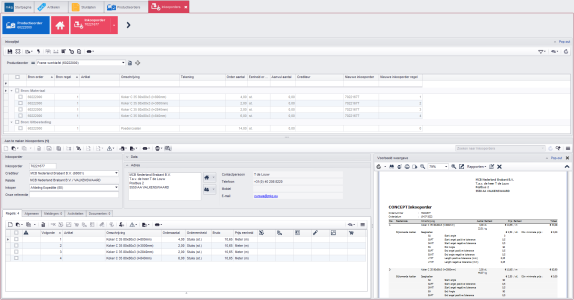
Create a Purchase Order with Specifications
Click Save
to create the purchase order. On each purchase order line, you will find - just like in the bill of materials material - the 'Purchase Specifications' tab, where the specification types are visible. The specification codes are also found here in the Detail of each specification type.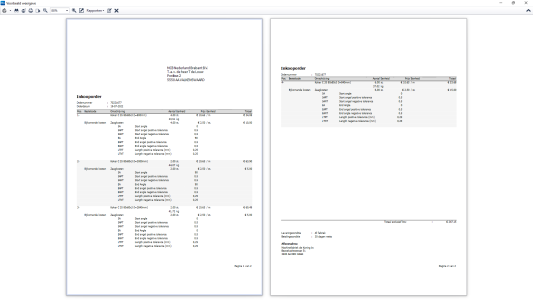
In the report Purchase Order (8405), the purchase specifications will be presented as "Additional Costs," where all specification codes are also listed. Click Preview
to display the report preview; via Pop-out you can show the preview on a second screen.
- Published:24 Feb 2026 23:17
- Latest update:25 Feb 2026 00:17
- TypeHandleidingen
- Category
- Product
- AvailabilityOpenbaar